This is something that bit me sometime ago: seems +=1 and -=1 aren’t atomic operations at VB.net and other .NET languages (not sure for C++) although modern CPUs have INC and DEC instructions at least for integers (maybe IL – intermediate language [for .NET compilers' target "theoretical" machine spec] – doesn’t define such?)
You have to use the class System.Threading.Interlocked and specifically the Increment and Decrement methods it has...
Showing posts with label reblog. Show all posts
Showing posts with label reblog. Show all posts
Friday, July 1, 2011
Reblog: +=1, -=1 not atomic operations at VB.net « George Birbilis @zoomicon
Friday, June 17, 2011
Reblog: [H]ard|OCP - Microsoft Launches Kinect for Windows SDK Beta
Microsoft Launches Kinect for Windows SDK Beta
You know all those cool videos we post showing people doing neat stuff with the Kinect? Well, now you can make your own thanks to the new Kinect of Windows SDK beta.

via hardocp.com
Cool!
Friday, June 10, 2011
Reblog: What is the Best Way to Apply Thermal Compound? | Hardware Secrets
We already explained how the thermal compound (a.k.a. thermal grease or thermal paste) works and a “how-to-apply-it” in our How to Correctly Apply Thermal Grease tutorial. Now, we will try seven different ways of applying it, testing each way, and comparing the cooling performance. Let's see if what we always mention - that less thermal compound is better than more - is true.
Each different method is presented in three pictures, one of the thermal compound applied to the CPU before installing the cooler, one of the CPU after the test with the cooler removed, and one of the base of the cooler after the test.
A nice article with some real test about how to apply thermal compund.
Friday, May 27, 2011
Reblog: .NET 4.0 and System.Threading.Tasks | CodeThinked
In the soon-to-be-released .NET 4.0 framework and Visual Studio 2010 we are going to get a plethora of new tools to help us write better multi-threaded applications. One of these tools is a new namespace within the System.Threading namespace which is called "Tasks". The Tasks in System.Threading.Tasks namespace are a method of fine grained parallelism, similar to creating and using threads, but they have a few key differences...
via codethinked.com
An interesting article about .Net 4.0 new Task class vs Thread and threading (multithread, threadpool, etc...)
Wednesday, May 25, 2011
Reblog: Debugging Classic ASP ( VBScript ) in Visual Studio 2008 - CodeProject
This is a step by step guide on how to set up your project so you can debug a site written in classic ASP VBScript using Visual Studio 2008
via codeproject.com
I read on the net that it should work even on VS 2010
Friday, May 20, 2011

Thursday, May 12, 2011
Reblog: Forcing 32-bit Execution in .NET | Brant Burnett's Development Blog
Sometimes when developing .NET applications it becomes necessary to force an application to run in 32-bit mode, even on a 64-bit processor. One scenario that I’ve run into is when you’re using Crystal Reports embedded in the application. I’m not sure about newer versions, but for Crystal Reports XI R2 it won’t work in 64-bit mode.In order to get something like that to work, you must force 32-bit execution on the executable. Forcing it on a DLL assembly in your application won’t help, then it won’t be able to load that DLL either. It needs to start in 32-bit mode from the beginning. If you can make the change in the development environment before compilation, just set the flags on the assembly there and everything will be great.
However, if you need to make the change to a compiled assembly it’s a little more difficult. To do so, use the corflags command-line utility. This program is included in the Windows SDK. To do so, simply run “corflags program.exe /32BIT+”.
If the assembly is strongly-named, then you must do a little more. First, you must add a /force flag, running “corflags program.exe /32BIT+ /Force”. Then, you must rehash and resign the assembly, using “sn -Ra program.exe key.snk”. In this case, key.snk is your key file for signing the assembly.
Hope this helps!
via btburnett.com
It helped :-)
Wednesday, May 11, 2011

Wednesday, May 4, 2011

Reblog: Coding Horror: Working with the Chaos Monkey
Raise your hand if where you work, someone deployed a daemon or service that randomly kills servers and processes in your server farm.
Now raise your other hand if that person is still employed by your company.
Who in their right mind would willingly choose to work with a Chaos Monkey?

interesting post about web service redundancy and correlated things
Monday, May 2, 2011
Reblog: Coding Horror
… I feel ethically and morally obligated to let you in on a dirty little secret I've discovered in the last two years of full time SSD ownership. Solid state hard drives fail. A lot. And not just any fail. I'm talking about catastrophic, oh-my-God-what-just-happened-to-all-my-data instant gigafail. It's not pretty.
via codinghorror.com
interesting post about SSD, and the fact that some of them seem to fail early
Thursday, April 28, 2011
Online icons search engine
From MakeUseOf,
http://www.makeuseof.com/tag/8-icon-search-engines-perfect-graphic-symbol/here's a list of online icon search engine http://www.iconlet.com/
http://findicons.com/
http://icons-search.com/
http://www.veryicon.com/
http://www.iconseeker.com/
http://www.easyiconfinder.com/
http://www.iconfinder.com/
http://www.makeuseof.com/tag/8-icon-search-engines-perfect-graphic-symbol/here's a list of online icon search engine http://www.iconlet.com/
http://findicons.com/
http://icons-search.com/
http://www.veryicon.com/
http://www.iconseeker.com/
http://www.easyiconfinder.com/
http://www.iconfinder.com/
Friday, April 15, 2011
Reblog: ExpandoObject class in C# 4.0 - DotNetJalps
ExpandoObject class in C# 4.0
As you know till now in c# everything was static and known at design time. But with the C# 4.0 language Microsoft have enabled new dynamic data type which is belongs to Dynamic Language Runtime on top of CLR(Common language Runtime). As you know that dynamic object will know their behaviour at run time. Here Microsoft has given one new class called ExpandoObject class. ExpandoObject class is a member of System.Dynamic namespace and is defined in the System.Core assembly. This class object members can be dynamically added and removed at runtime. This is class is a sealed class and implements number of interfaces like below.
public sealed class ExpandoObject : IDynamicMetaObjectProvider, IDictionary<string, object>, ICollection<KeyValuePair<string, object>>, IEnumerable<KeyValuePair<string, object>>, IEnumerable, INotifyPropertyChanged;Now let’s take a simple example of console application. Where we will create a object of expandoobject class and manipulate that class at run time. Let’s create a simple code like below.
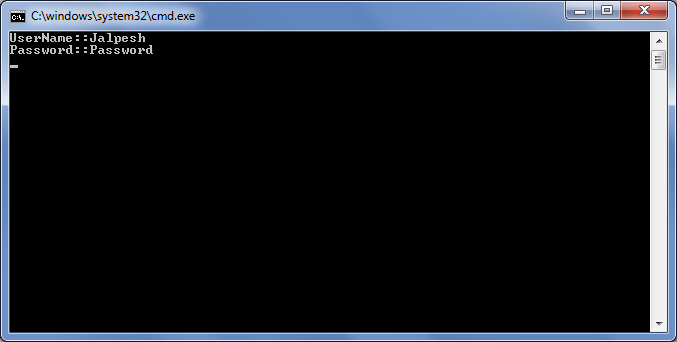
using System; using System.Collections.Generic; using System.Linq; using System.Text; namespace ExpandoObject { class Program { static void Main(string[] args) { dynamic users = new System.Dynamic.ExpandoObject(); users.UserName = "Jalpesh"; users.Password = "Password"; Console.WriteLine(string.Format("{0}:{1}","UserName:",users.UserName)); Console.WriteLine(string.Format("{0}:{1}","Password:",users.Password)); Console.ReadKey(); } } }Here in the above code I have added a new memeber called UserName and Password for the new dynamic user type and then print their value. Now let’s run the application and see its output as below
That’s it. You can add valid type of member to ExpandoOjbect class. Isn’t interesting.. Hope you liked it.. Stay tuned for more..
via weblogs.asp.net
Wednesday, April 13, 2011
Reblog: How to make "Copy As HTML" Visual Studio 2008 addins work on VS2010
Hello,To make it work on Visual Studio 2010, go to the installation folder of the addin, usually it will pick your MyDocument folder '.\MyDocument\Visual Studio 2008\Addins', copy the addin to the new Visual Studio folder '.\MyDocument\Visual Studio 2010\Addins'.
Here are the folders and files you need to copy.
\de-DE
\es-ES
\fr-FR
\he-IL
\it-IT
\ja-JP
\ko-KR
\zh-CHS
\zh-CHT
LavernockEnterprises.CopyAsHtml.2008.AddIn
LavernockEnterprises.CopyAsHtml.dllAfter you done with it, you will need to edit this file 'LavernockEnterprises.CopyAsHtml.2008.AddIn' and add Visual Studio to the supported hosts.
Add the following above the existing entry.
<HostApplication>
<Name>Microsoft Visual Studio</Name>
<Version>10.0</Version>
</HostApplication>
Here you can find the CopyAsHTML Addin
http://visualstudiogallery.msdn.microsoft.com/98fef791-eb65-4cdf-bf84-077b98c...
Subscribe to:
Posts (Atom)