Personal blog about Information technology, Software development, and other Techy things
Wednesday, February 4, 2015
Single click conversion form any format to MOBI using Calibre
The script was very simple to use, just put the script in the Calibre folder, and then drag and drop the file you want to convert on the script.
Last year I added some more feature to the script.
Today a reader asked for a script that convert in MOBI format, so I created a new version of the script that convert to MOBI.
Click here to Download the 'anything to MOBI' conversion script.
You need to place this script in the same folder where you have the Calibre executable.
Then you can drag and drop the file you want to convert on the script:
After the conversion, you'll find the new converted EPUB file in the same folder as the original file.
Check the original articles for more information about this script, and how to use it.
Friday, January 31, 2014
SQL Server: use a cursor to fetch rows, then split a comma separated string in a column, and loop all the values
Today an anonymous user asked how does this apply if you are reading comma separated string from a column in a DB.
The simplest way would probably be to do these kind of thing in a proper programming language (C++, C#, VB, Java.... you name it)
But if you really need to do this in T-SQL you can simply use a SQL Server cursor to enumerate the rows of the table, and then split the string one-by-one.
So, suppose we have a column in a table that contain comma separated values, we ca use a stored procedure with the following code. (as of today this code is UNTESTED, just because I don't have a SQL Server instance installed on my home computer :-) )
DECLARE @valueList varchar(8000) DECLARE @pos INT DECLARE @len INT DECLARE @value varchar(8000) DECLARE my_string_table_cursor CURSOR FOR SELECT my_column_string FROM my_table OPEN my_string_table_cursor FETCH NEXT FROM my_string_table_cursor INTO @valueList WHILE @@FETCH_STATUS = 0 BEGIN set @pos = 0 set @len = 0 WHILE CHARINDEX(',', @valueList, @pos+1)>0 BEGIN set @len = CHARINDEX(',', @valueList, @pos+1) - @pos set @value = SUBSTRING(@valueList, @pos, @len) --SELECT @pos, @len, @value /*this is here for debugging*/ PRINT @value --Here is you value --DO YOUR STUFF HERE --DO YOUR STUFF HERE --DO YOUR STUFF HERE --DO YOUR STUFF HERE --DO YOUR STUFF HERE set @pos = CHARINDEX(',', @valueList, @pos+@len) +1 END FETCH NEXT FROM my_string_table_cursor INTO @valueList END CLOSE my_string_table_cursor DEALLOCATE my_string_table_cursor
row 1: aa,bb,cc,dwefwef,43truygtfuye,w,
row 2: trd , ygu , umhb , bhu,
row 3: a,b,c,d,e,f,g,h,i,
row 4: 123,a,456,bbb,kkk,00000,
And the string in each row must end with a comma ","
SQL Code colored with this syntax highlighter
Wednesday, January 1, 2014
Single click conversion form any format to EPUB using Calibre v2.0 - now with batch multiple files conversion, and rename instead than overwrite
The script was very simple to use, just put the script in the Calibre folder, and then drag and drop the file you want to convert on the script.
Today a reader asked for 2 new features:
- being able to convert multiple files at once
- don't overwrite the epub file that may already exist
Click here to Download the new version of the script.
You need to place this script in the same folder where you have the Calibre executable.
Then you can drag and drop the file you want to convert on the script:
After the conversion, you'll find the new converted EPUB file in the same folder as the original file.
Check the original article for more information about this script, and how to use it.
About the new features
Now, for example, you can select 10 PDF files and drop them on the script, and they'll get converted to EPUB (and Author and Title will be set, check the original article for more information)
If the epub file already exist, now the script will add current date/time to the filename.
Example: you try to convert a file named "Asimov - Nightfall.pdf", the script try to create a file named "Asimov - Nightfall.epub", but if this file already exist the script will then create a file named "Asimov - Nightfall 01_01_2014 21.13.52,34.epub" by adding current date/time to the filename.
This updated script, in theory, can convert up to 400 files at once.
The real limitation came from Windows max command line length, that is limited to 8191characters.
So, in real life, you probably won't be able to drag and drop 400 files on the script, because their full pathname will be longer than 8191 characters.
By "Full pathname" i mean the full path + filename of the files, so a full pathname of a file my look something like "E:\eBook\asimov books\series\Asimov - Empire 1.pdf" whick is long 52 chars.
So if you have files like that, you can convert a maximum of about 8192 / 52 = 157 files at once.
Depending on you filename and folder structure your mileage may vary.
Inside the script...
Here is a color-coded version of the EPUB conversion script, the same script you can download here.
(color coded version of the script created by the courtesy of http://hilite.me/ using the 'native' profile, and then tweaking color by hand)
1 2 3 4 5 6 7 8 9 10 11 12 13 14 15 16 17 18 19 20 21 22 23 24 25 26 27 28 29 30 31 32 33 34 35 36 37 38 39 40 41 42 43 44 45 46 47 48 49 50 51 52 53 54 55 56 57 58 59 60 61 62 63 64 65 66 67 68 69 70 71 72 73 74 75 76 77 78 79 80 81 82 83 84 85 86 87 88 89 90 91 92 93 94 95 96 97 98 99 100 101 102 103 104 105 106 107 108 109 110 111 112 113 114 115 116 117 118 119 120 121 122 123 124 125 126 127 128 129 130 131 132 133 134 135 136 137 138 139 140 141 142 143 144 145 146 147 148 149 150 151 152 153 154 155 156 157 158 159 160 161 162 163 164 165 166 167 168 169 170 171 172 173 174 175 176 177 178 179 180 181 182 183 184 185 186 187 188 189 190 191 192 193 194 195 196 197 198 199 200 201 202 203 204 205 206 207 208 209 210 211 212 213 214 215 216 217 218 219 220 221 222 223 224 225 226 227 228 229 230 231 232 233 234 235 236 237 238 239 240 241 242 243 244 245 246 247 248 249 250 251 252 253 254 255 256 257 258 259 260 261 262 263 264 265 266 267 268 269 270 271 272 273 274 275 276 277 278 279 280 281 282 283 284 285 286 287 288 289 290 291 292 293 294 295 296 297 298 299 300 301 302 303 304 305 306 307 308 309 310 311 312 313 314 315 316 317 318 319 320 321 322 323 324 325 326 327 328 329 330 331 332 333 334 335 336 337 338 339 340 341 342 343 344 345 346 347 348 349 350 351 352 353 354 355 356 357 358 359 360 361 362 363 364 365 366 367 368 369 370 371 372 373 374 375 376 377 378 379 380 381 382 383 384 385 386 387 388 389 390 391 392 393 394 395 396 397 398 399 400 401 402 403 404 405 406 407 408 409 410 411 412 413 414 415 416 417 418 419 420 421 422 423 424 425 426 427 428 429 430 431 432 433 434 435 436 437 438 439 440 441 442 443 444 445 446 447 448 449 450 451 452 453 454 455 456 457 | @echo off setlocal EnableDelayedExpansion rem find script path set scriptPath=%~dp0 set scriptPath=%scriptPath:~0,-1% rem "%scriptPath%\pyprogram.exe" /myparam=123_abcd IF EXIST "%~1" (CALL :epubConvert "%~1") SHIFT IF EXIST "%~1" (CALL :epubConvert "%~1") SHIFT IF EXIST "%~1" (CALL :epubConvert "%~1") SHIFT IF EXIST "%~1" (CALL :epubConvert "%~1") SHIFT IF EXIST "%~1" (CALL :epubConvert "%~1") SHIFT IF EXIST "%~1" (CALL :epubConvert "%~1") SHIFT IF EXIST "%~1" (CALL :epubConvert "%~1") SHIFT IF EXIST "%~1" (CALL :epubConvert "%~1") SHIFT IF EXIST "%~1" (CALL :epubConvert "%~1") SHIFT IF EXIST "%~1" (CALL :epubConvert "%~1") SHIFT IF EXIST "%~1" (CALL :epubConvert "%~1") SHIFT IF EXIST "%~1" (CALL :epubConvert "%~1") SHIFT IF EXIST "%~1" (CALL :epubConvert "%~1") SHIFT IF EXIST "%~1" (CALL :epubConvert "%~1") SHIFT IF EXIST "%~1" (CALL :epubConvert "%~1") SHIFT IF EXIST "%~1" (CALL :epubConvert "%~1") SHIFT IF EXIST "%~1" (CALL :epubConvert "%~1") SHIFT IF EXIST "%~1" (CALL :epubConvert "%~1") SHIFT IF EXIST "%~1" (CALL :epubConvert "%~1") SHIFT IF EXIST "%~1" (CALL :epubConvert "%~1") SHIFT IF EXIST "%~1" (CALL :epubConvert "%~1") SHIFT IF EXIST "%~1" (CALL :epubConvert "%~1") SHIFT IF EXIST "%~1" (CALL :epubConvert "%~1") SHIFT IF EXIST "%~1" (CALL :epubConvert "%~1") SHIFT IF EXIST "%~1" (CALL :epubConvert "%~1") SHIFT IF EXIST "%~1" (CALL :epubConvert "%~1") SHIFT IF EXIST "%~1" (CALL :epubConvert "%~1") SHIFT IF EXIST "%~1" (CALL :epubConvert "%~1") SHIFT IF EXIST "%~1" (CALL :epubConvert "%~1") SHIFT IF EXIST "%~1" (CALL :epubConvert "%~1") SHIFT IF EXIST "%~1" (CALL :epubConvert "%~1") SHIFT IF EXIST "%~1" (CALL :epubConvert "%~1") SHIFT IF EXIST "%~1" (CALL :epubConvert "%~1") SHIFT IF EXIST "%~1" (CALL :epubConvert "%~1") SHIFT IF EXIST "%~1" (CALL :epubConvert "%~1") SHIFT IF EXIST "%~1" (CALL :epubConvert "%~1") SHIFT IF EXIST "%~1" (CALL :epubConvert "%~1") SHIFT IF EXIST "%~1" (CALL :epubConvert "%~1") SHIFT IF EXIST "%~1" (CALL :epubConvert "%~1") SHIFT IF EXIST "%~1" (CALL :epubConvert "%~1") SHIFT IF EXIST "%~1" (CALL :epubConvert "%~1") SHIFT IF EXIST "%~1" (CALL :epubConvert "%~1") SHIFT IF EXIST "%~1" (CALL :epubConvert "%~1") SHIFT IF EXIST "%~1" (CALL :epubConvert "%~1") SHIFT IF EXIST "%~1" (CALL :epubConvert "%~1") SHIFT IF EXIST "%~1" (CALL :epubConvert "%~1") SHIFT IF EXIST "%~1" (CALL :epubConvert "%~1") SHIFT IF EXIST "%~1" (CALL :epubConvert "%~1") SHIFT IF EXIST "%~1" (CALL :epubConvert "%~1") SHIFT IF EXIST "%~1" (CALL :epubConvert "%~1") SHIFT IF EXIST "%~1" (CALL :epubConvert "%~1") SHIFT IF EXIST "%~1" (CALL :epubConvert "%~1") SHIFT IF EXIST "%~1" (CALL :epubConvert "%~1") SHIFT IF EXIST "%~1" (CALL :epubConvert "%~1") SHIFT IF EXIST "%~1" (CALL :epubConvert "%~1") SHIFT IF EXIST "%~1" (CALL :epubConvert "%~1") SHIFT IF EXIST "%~1" (CALL :epubConvert "%~1") SHIFT IF EXIST "%~1" (CALL :epubConvert "%~1") SHIFT IF EXIST "%~1" (CALL :epubConvert "%~1") SHIFT IF EXIST "%~1" (CALL :epubConvert "%~1") SHIFT IF EXIST "%~1" (CALL :epubConvert "%~1") SHIFT IF EXIST "%~1" (CALL :epubConvert "%~1") SHIFT IF EXIST "%~1" (CALL :epubConvert "%~1") SHIFT IF EXIST "%~1" (CALL :epubConvert "%~1") SHIFT IF EXIST "%~1" (CALL :epubConvert "%~1") SHIFT IF EXIST "%~1" (CALL :epubConvert "%~1") SHIFT IF EXIST "%~1" (CALL :epubConvert "%~1") SHIFT IF EXIST "%~1" (CALL :epubConvert "%~1") SHIFT IF EXIST "%~1" (CALL :epubConvert "%~1") SHIFT IF EXIST "%~1" (CALL :epubConvert "%~1") SHIFT IF EXIST "%~1" (CALL :epubConvert "%~1") SHIFT IF EXIST "%~1" (CALL :epubConvert "%~1") SHIFT IF EXIST "%~1" (CALL :epubConvert "%~1") SHIFT IF EXIST "%~1" (CALL :epubConvert "%~1") SHIFT IF EXIST "%~1" (CALL :epubConvert "%~1") SHIFT IF EXIST "%~1" (CALL :epubConvert "%~1") SHIFT IF EXIST "%~1" (CALL :epubConvert "%~1") SHIFT IF EXIST "%~1" (CALL :epubConvert "%~1") SHIFT IF EXIST "%~1" (CALL :epubConvert "%~1") SHIFT IF EXIST "%~1" (CALL :epubConvert "%~1") SHIFT IF EXIST "%~1" (CALL :epubConvert "%~1") SHIFT IF EXIST "%~1" (CALL :epubConvert "%~1") SHIFT IF EXIST "%~1" (CALL :epubConvert "%~1") SHIFT IF EXIST "%~1" (CALL :epubConvert "%~1") SHIFT IF EXIST "%~1" (CALL :epubConvert "%~1") SHIFT IF EXIST "%~1" (CALL :epubConvert "%~1") SHIFT IF EXIST "%~1" (CALL :epubConvert "%~1") SHIFT IF EXIST "%~1" (CALL :epubConvert "%~1") SHIFT IF EXIST "%~1" (CALL :epubConvert "%~1") SHIFT IF EXIST "%~1" (CALL :epubConvert "%~1") SHIFT IF EXIST "%~1" (CALL :epubConvert "%~1") SHIFT IF EXIST "%~1" (CALL :epubConvert "%~1") SHIFT IF EXIST "%~1" (CALL :epubConvert "%~1") SHIFT IF EXIST "%~1" (CALL :epubConvert "%~1") SHIFT IF EXIST "%~1" (CALL :epubConvert "%~1") SHIFT IF EXIST "%~1" (CALL :epubConvert "%~1") SHIFT IF EXIST "%~1" (CALL :epubConvert "%~1") SHIFT IF EXIST "%~1" (CALL :epubConvert "%~1") SHIFT IF EXIST "%~1" (CALL :epubConvert "%~1") SHIFT IF EXIST "%~1" (CALL :epubConvert "%~1") SHIFT IF EXIST "%~1" (CALL :epubConvert "%~1") rem this goto if here to skip the code of the confesion function goto :endOfBatchfile rem start of a sub function :epubConvert set filename=%~n1 REM split authors from title using the first "-" as separator REM using ! and EnableDelayedExpansion instead of % so that filename containing parenthesis wont cause issue FOR /F "usebackq tokens=1* delims=-" %%a in ('!filename!') do ( set autore= %%a set titolo= %%b ) rem trim authors name extra space from left/right for /f "tokens=* delims= " %%a in ("!autore!") do set autore=%%a set autore=%autore%## set autore=%autore: ##=##% set autore=%autore: ##=##% set autore=%autore: ##=##% set autore=%autore: ##=##% set autore=%autore: ##=##% set autore=%autore:##=% echo. Authors: "%autore%" rem trim titles extra space from left/right for /f "tokens=* delims= " %%a in ("!titolo!") do set titolo=%%a set titolo=%titolo%## set titolo=%titolo: ##=##% set titolo=%titolo: ##=##% set titolo=%titolo: ##=##% set titolo=%titolo: ##=##% set titolo=%titolo: ##=##% set titolo=%titolo:##=% echo. Title: "%titolo%" echo. echo. REM if the filename doesent contains any "-" then %titolo% will be empty IF "%titolo%"=="" ( set titolo=!autore! set autore=unknown ) set InputfileParameters=--remove-paragraph-spacing set PDFInputfileParameters= set EpubInternalHTMLsplitSize=--flow-size 50 IF "%~x1"=="PDF" set PDFInputfileParameters=--unwrap-factor 0.25 set outputFileName=%~dp1%autore% - %titolo%.epub REM If filename alrteady exist, use a different name (I'll append current date/time to create a uinique filename) IF EXIST "%outputFileName%" ( rem Get current date SET DT=%date% rem remove character invalid for filename SET DT=!DT:\=_! SET DT=!DT:/=_! SET DT=!DT:-=_! SET DT=!DT:.=_! SET DT=!DT::=_! rem Get current time SET TM=%time% rem remove character invalid for filename SET TM=!TM:\=.! SET TM=!TM:/=.! SET TM=!TM:-=.! SET TM=!TM::=.! set outputFileName=%~dp1%autore% - %titolo% !DT! !TM!.epub ) "%scriptPath%\ebook-convert.exe" "%~1" "%outputFileName%" %InputfileParameters% %PDFInputfileParameters% %EpubInternalHTMLsplitSize% --authors "%autore%" --title "%titolo%" IF %ERRORLEVEL% NEQ 0 pause rem end of sub function goto :eof rem end of the batch file :endOfBatchfile |
This batch file is very similar to the old one.
All the main code to do the conversion is included in a Sub function called epubConvert.
At the beginning of the file I've added about 400 lines of command like Switch / Call epubConvert %1- Switch / Call epubConvert %1 - Switch / Call epubConvert %1 - ...
By implementing these feature I even discovered a new batch command (shift) that I've never used before, it's very useful if you need to manage more than 9 command line parameters :-)
Thursday, March 7, 2013
How to split a comma separated string and loop it's values in SQL Server
It's a simple way to create a array/list of things in SQL Server, and then do something on the values of the list.
These values can be anything: table names, stored procedures, query...
I've update the code to work even with a value list that doesn't have a trailing comma
DECLARE @valueList varchar(8000) DECLARE @pos INT DECLARE @len INT DECLARE @value varchar(8000) SET @valueList = 'aa,bb,cc,f,sduygfdctys,w,e,r,t,sd sdf sdf,yyy yyy yy,' --the value list string must end with a comma ',' --so, if the last comma it's not there, the following IF will add a trailing comma to the value list IF @valueList NOT LIKE '%,' BEGIN set @valueList = @valueList + ',' END set @pos = 0 set @len = 0 WHILE CHARINDEX(',', @valueList, @pos+1)>0 BEGIN set @len = CHARINDEX(',', @valueList, @pos+1) - @pos set @value = SUBSTRING(@valueList, @pos, @len) --SELECT @pos, @len, @value /*this is here for debugging*/ PRINT @value --Here is you value --DO YOUR STUFF HERE --DO YOUR STUFF HERE --DO YOUR STUFF HERE --DO YOUR STUFF HERE --DO YOUR STUFF HERE set @pos = CHARINDEX(',', @valueList, @pos+@len) +1 END
The output of this script is:
aa
bb
cc
f
sduygfdctys
w
e
r
t
sd sdf sdf
yyy yyy yy
SQL Code colored with this syntax highlighter
How to rebuild all index on all tables in a SQL Server database
Here is the T-SQL code:
DECLARE @tbName varchar(255) DECLARE tbCursor CURSOR FOR SELECT table_name FROM information_schema.tables WHERE table_type = 'base table' OPEN tbCursor FETCH NEXT FROM tbCursor INTO @tbName WHILE @@FETCH_STATUS = 0 BEGIN PRINT 'rebuilding all indexes on ' + @tbName DBCC DBREINDEX (@tbName,' ',0) WITH NO_INFOMSGS FETCH NEXT FROM tbCursor INTO @tbName END CLOSE tbCursor DEALLOCATE tbCursor
The source for this code is in the comments of this blog post
I just changed the code a bit, and color-coded it for easier reading (using this highlighter)
Wednesday, November 2, 2011
Compact theme for Google Reader via GreaseMonkey script - More clear, more readable, hidden header, hidden top navigation bar, less unused white space - Perfect for small screen
Not everybody like the new (1/11/2011) Google Reader user interface.
I don't like it, especially because I use Google Reader on a netbook with a 10" screen of 1024x600 pixel.
The new theme have too much white, unused, space. Too much header. and few space for actual contents.
Just some hour after the release of the new interface there have been a big proliferation of "fix" for the new interface, especially on userscript.org (Greasemonkey script archive).
After testing them all, I've come up with my own version of these script.
My script is based on "Google Reader Back", I've just added some code to hide some more element (feed title, top navigation bar, top header with search button).
Here is my scriptGoogle Reader Compact For Small Screen (http://userscripts.org/scripts/show/116957)
Here are the result, before:
and after, with my script installed
Fell free to use it or modify it.A big thanks to Hoong Ern, the developer of Google Reader Back (http://userscripts.org/users/416220) upon which is based my script.
Comments and suggestion are welcome.
Wednesday, July 6, 2011
Set ComboBox dropdown height in Visual Basic 6 (VB6) ComboBox control
Here is a useful piece of code to set the ComboBox dropdown height for VB6 ComboBox control.
Dim oldscalemode As Integer
' This procedure does not work with frames: you cannot set the ScaleMode to vbPixels, because
' the frame does not have a ScaleMode Property.
' To get round this, you could set the parent control to be the form while you run this procedure.
If TypeOf oComboBox.Parent Is Frame Then Exit Sub
' Change the ScaleMode on the parent to Pixels.
oldscalemode = oComboBox.Parent.ScaleMode
oComboBox.Parent.ScaleMode = vbPixels
' Resize the combo box window.
MoveWindow oComboBox.hwnd, oComboBox.Left, oComboBox.Top, oComboBox.Width, lNewHeight, 1
' Replace the old ScaleMode
oComboBox.Parent.ScaleMode = oldscalemode
End Sub
I've found this code on the web.
I would like to thanks to the original developer :-)
Friday, July 1, 2011
Reblog: +=1, -=1 not atomic operations at VB.net « George Birbilis @zoomicon
This is something that bit me sometime ago: seems +=1 and -=1 aren’t atomic operations at VB.net and other .NET languages (not sure for C++) although modern CPUs have INC and DEC instructions at least for integers (maybe IL – intermediate language [for .NET compilers' target "theoretical" machine spec] – doesn’t define such?)
You have to use the class System.Threading.Interlocked and specifically the Increment and Decrement methods it has...
Patterns for Parallel Programming (free downloadable pdf book by Microsoft) Understanding and Applying Parallel Patterns with the .NET Framework 4 - VB and C#
Here you can find a free downloadable PDF boook (118 pages) from microsoft, that talk about common pattern for parallel programming in .Net 4.0, VB and C#
Download link: http://www.microsoft.com/download/en/details.aspx?displaylang=en&id=19222
Friday, May 27, 2011
Reblog: .NET 4.0 and System.Threading.Tasks | CodeThinked
In the soon-to-be-released .NET 4.0 framework and Visual Studio 2010 we are going to get a plethora of new tools to help us write better multi-threaded applications. One of these tools is a new namespace within the System.Threading namespace which is called "Tasks". The Tasks in System.Threading.Tasks namespace are a method of fine grained parallelism, similar to creating and using threads, but they have a few key differences...
An interesting article about .Net 4.0 new Task class vs Thread and threading (multithread, threadpool, etc...)
Fabrice Bellard's In browser Javascript PC emulator that boot linux!
A PC emulator in Javascript
That's incredible! It's an x86 PC emulator written in javascript that can boot linux in a browser window!
Wednesday, May 25, 2011
Reblog: Debugging Classic ASP ( VBScript ) in Visual Studio 2008 - CodeProject
This is a step by step guide on how to set up your project so you can debug a site written in classic ASP VBScript using Visual Studio 2008
I read on the net that it should work even on VS 2010
Thursday, May 12, 2011
Reblog: Forcing 32-bit Execution in .NET | Brant Burnett's Development Blog
Sometimes when developing .NET applications it becomes necessary to force an application to run in 32-bit mode, even on a 64-bit processor. One scenario that I’ve run into is when you’re using Crystal Reports embedded in the application. I’m not sure about newer versions, but for Crystal Reports XI R2 it won’t work in 64-bit mode.In order to get something like that to work, you must force 32-bit execution on the executable. Forcing it on a DLL assembly in your application won’t help, then it won’t be able to load that DLL either. It needs to start in 32-bit mode from the beginning. If you can make the change in the development environment before compilation, just set the flags on the assembly there and everything will be great.
However, if you need to make the change to a compiled assembly it’s a little more difficult. To do so, use the corflags command-line utility. This program is included in the Windows SDK. To do so, simply run “corflags program.exe /32BIT+”.
If the assembly is strongly-named, then you must do a little more. First, you must add a /force flag, running “corflags program.exe /32BIT+ /Force”. Then, you must rehash and resign the assembly, using “sn -Ra program.exe key.snk”. In this case, key.snk is your key file for signing the assembly.
Hope this helps!
It helped :-)
Wednesday, May 4, 2011
Reblog: Coding Horror: Working with the Chaos Monkey
Raise your hand if where you work, someone deployed a daemon or service that randomly kills servers and processes in your server farm.
Now raise your other hand if that person is still employed by your company.
Who in their right mind would willingly choose to work with a Chaos Monkey?
interesting post about web service redundancy and correlated things
Wednesday, April 20, 2011
Inno Setup Extensions Knowledge Base
Inno Setup Extensions Knowledge Base Inno Setup is an open source script-driven installation system created in Delphi by Jordan Russell.
The Inno Setup Extensions Knowledge Base (ISXKB) aims to support users of this installation system by providing a source of information, code snippets, guide lines, and ready-to-use solutions.
There are currently 150 articles in the ISXKB. You can search the ISXKB, browse through a list with all articles, or view them sorted by category. A list sorted by article popularity is also available as well as all special pages.
Friday, April 15, 2011
Reblog: ExpandoObject class in C# 4.0 - DotNetJalps
ExpandoObject class in C# 4.0
As you know till now in c# everything was static and known at design time. But with the C# 4.0 language Microsoft have enabled new dynamic data type which is belongs to Dynamic Language Runtime on top of CLR(Common language Runtime). As you know that dynamic object will know their behaviour at run time. Here Microsoft has given one new class called ExpandoObject class. ExpandoObject class is a member of System.Dynamic namespace and is defined in the System.Core assembly. This class object members can be dynamically added and removed at runtime. This is class is a sealed class and implements number of interfaces like below.
public sealed class ExpandoObject : IDynamicMetaObjectProvider, IDictionary<string, object>, ICollection<KeyValuePair<string, object>>, IEnumerable<KeyValuePair<string, object>>, IEnumerable, INotifyPropertyChanged;Now let’s take a simple example of console application. Where we will create a object of expandoobject class and manipulate that class at run time. Let’s create a simple code like below.
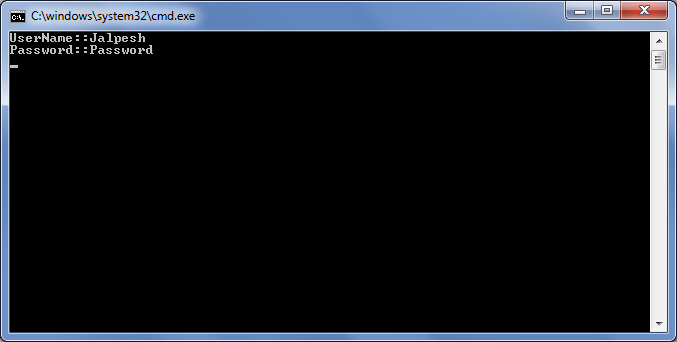
using System; using System.Collections.Generic; using System.Linq; using System.Text; namespace ExpandoObject { class Program { static void Main(string[] args) { dynamic users = new System.Dynamic.ExpandoObject(); users.UserName = "Jalpesh"; users.Password = "Password"; Console.WriteLine(string.Format("{0}:{1}","UserName:",users.UserName)); Console.WriteLine(string.Format("{0}:{1}","Password:",users.Password)); Console.ReadKey(); } } }Here in the above code I have added a new memeber called UserName and Password for the new dynamic user type and then print their value. Now let’s run the application and see its output as below
That’s it. You can add valid type of member to ExpandoOjbect class. Isn’t interesting.. Hope you liked it.. Stay tuned for more..